


Tagged - Meet, Chat & Dating
4.1135.19K Reviews
App Specs
- Version
- 232.1
- Updated On
- License
- Free
- Downloads
- 50,000,000+
- Developer
- Ifwe Inc.
- Categories
- Social
- Platform
- Android, iOS
Screenshots


 Analysis by AppCompare
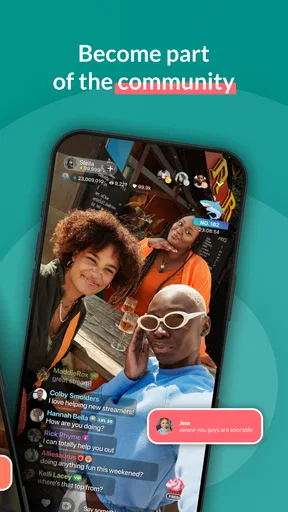
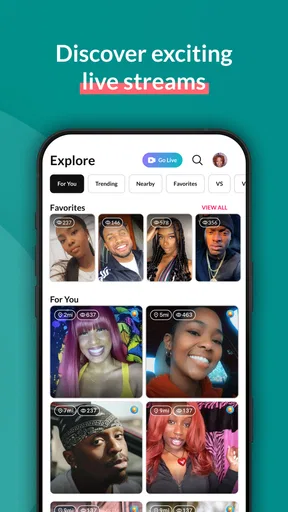
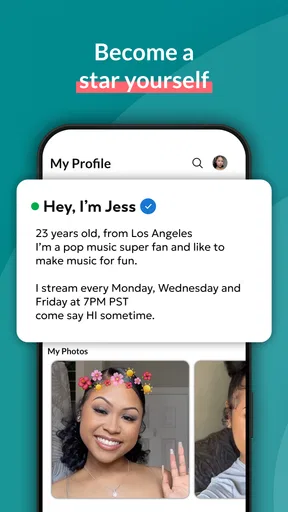
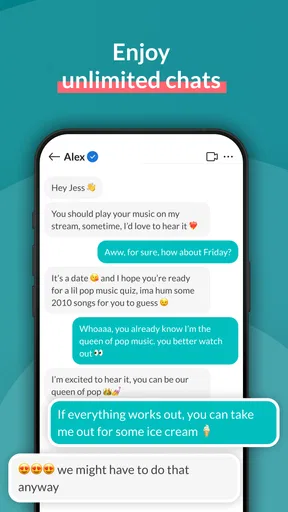
I approached Tagged as a social app first, rather than assuming it would feel like a traditional dating service. Its main appeal is the chance to meet people through live video, chat, and casual interaction, so the experience depends less on a carefully edited profile and more on how comfortable you are joining an active, unpredictable social space. After spending time with it, my view is that it suits people who enjoy spontaneous conversations and browsing a busy community, but it is not the best match for anyone looking for a quiet, highly filtered, or strictly private way to meet others.
The app comes from Ifwe Inc. and is free to install, although optional in-app purchases range from $0.99 to $249.99 per item. That price structure matters because the basic download is easy to try, while deeper participation can encourage spending. Tagged is rated Mature 17+, which feels important here: live interaction and dating-oriented conversations can be less predictable than ordinary messaging, and I would not treat it as a casual app for younger users.
How Tagged feels in everyday use
I find Tagged’s everyday rhythm easiest to judge by asking what I want from a visit before I open it: a quick chat, a look at live activity, or simply a little social company. That small choice helps me keep spontaneous discovery enjoyable rather than letting it take over my attention. It also sets up the next question: how to stay open to conversation while keeping my own boundaries clear.
Speed expectations when moving between social spaces
My first impression was that Tagged is built for quick decisions. You open it expecting to browse, chat, or watch what is happening rather than compose a long profile or plan a detailed introduction. That gives the app an immediate quality: it is easy to dip in for a few minutes, see who is active, and decide whether you want to participate.
The perceived speed is therefore not only about loading screens. It is also about how fast you can understand what to do next. A social app becomes tiring when every action requires too much setup, but Tagged’s live-oriented design points you toward conversation quickly. I found that useful when I wanted something more interactive than scrolling through static profiles.
There is a trade-off. Fast access to people also means faster social pressure. A live conversation does not give you the same time to polish a message that a conventional dating app does. If you prefer to think carefully before replying, the pace can feel demanding even when the app itself feels responsive. I would use it when I am in the mood to be present, not when I want to casually answer messages while doing several other things.
A practical routine works well: I would enter with one simple goal, such as checking live rooms or replying to a conversation, instead of trying to explore every social area at once. That keeps the experience focused and makes it easier to leave without feeling that I have missed something important. The app rewards short, intentional visits more than aimless wandering.
Worth Reading Before You Choose

EA SPORTS FC Mobile 26 Is a Bigger Football Game, but It Takes Time

Flipboard Shows What News Apps Must Do Beyond the Feed

Switching to Android Auto Means Rethinking Your Driving Routine

Google Calendar Makes a Crowded Week Easier to Manage

Ludo King Makes the Most of the Minutes Between Plans

Baby Panda World Brings Quick Play to Modern Phones, but Its Game Library Feels Busy
What happens during heavier sessions
Live video and social discovery naturally ask more from a phone than a basic text-only messenger. When I imagine using Tagged for a longer session, the demanding moments are the ones involving several conversations, continuous video, or frequent movement between active areas. Those are the situations where battery use, heat, and mobile data become more relevant than they would during a short chat.
I would not judge the app only by a quick opening. A ten-minute text exchange is a very different workload from staying in a live social environment while switching between people. If you plan to use it for extended periods, Wi-Fi is the sensible choice, especially if your mobile plan is limited. Keeping the phone connected to a charger can also make a difference during longer video-focused visits.
One useful habit is to separate discovery from conversation. I prefer to browse first, choose one interaction that genuinely interests me, and then stay with it rather than constantly jumping between rooms or profiles. This is better socially because it gives the other person your attention, and it is likely easier on the device than repeatedly refreshing active content.
Tagged is also more demanding emotionally during heavy use. A long session can expose you to many different personalities, invitations, and conversation styles in a short time. That can be entertaining, but it can also become noisy. I recommend setting a personal stopping point before opening the app. The ability to meet many people quickly is a strength, yet it can make the experience feel scattered if you never pause.
Reliability and recovering from interruptions
For a live social app, reliability is not simply whether it opens. The important question is what happens when your connection changes, a video interaction is interrupted, or you leave and return later. Live communication is less forgiving than ordinary text because a short interruption can break the rhythm of a conversation.
My advice is to treat live sessions as more fragile than saved messages. If a conversation matters, move important details into a normal chat or another familiar channel rather than assuming a live exchange will remain available exactly as you left it. This is not a criticism of one particular screen; it is a sensible workflow for any service where real-time interaction is central.
I also would not start an important conversation while moving through areas with unreliable reception. Tagged makes more sense when you can give it a stable connection and a few uninterrupted minutes. If the app or a live interaction needs to recover, closing distractions, checking the connection, and reopening the relevant area is a more practical response than repeatedly tapping every control.
The app’s long presence in the social category gives it a familiar identity. It was released on January 12, 2011, and its current version is 232.1. I see that history as useful context rather than a guarantee: a mature app can offer a well-established community, but it can also carry a broader mix of older and newer interaction habits. I would still keep the app updated through the official store so that the installed version remains current.
Device limits and who should think twice
Tagged supports devices running Android 8.0 or later. That makes the minimum requirement fairly approachable for people using older compatible phones, but the operating-system requirement is only one part of the decision. A phone that technically runs the app may still feel less comfortable during live video if it has limited battery capacity, little free storage, or struggles with other demanding apps running in the background.
If your phone is older, I would begin with short text-based visits and then test live video separately. That gives you a clearer idea of how your own device handles the app without committing to a long session. Reducing background activity and avoiding simultaneous downloads are simple ways to make a social app feel less strained, even though they cannot replace a stronger connection or newer hardware.
People who use small data allowances should be especially deliberate. Browsing profiles and chatting by text are easier to fit into a limited plan than frequent live video. I would also avoid using the app in situations where privacy is difficult, such as a shared room with conversations audible to others. The Mature 17+ rating is a reminder to approach the social environment with adult judgment, not to assume every interaction will be suitable or trustworthy.
Parents should not choose Tagged as a general-purpose family social app. The age rating makes the intended audience clear, and live contact with strangers requires boundaries that younger users may not be ready to manage. Adults should also avoid sharing personal information too quickly. A friendly conversation is not the same as a verified relationship, and the speed of meeting people can make caution easy to forget.
Where it fits beside ordinary alternatives
Compared with a standard dating app built around swiping and carefully arranged profiles, Tagged feels more immediate and less formal. That is its clearest difference. A profile-first service is usually better when you want to compare interests, photos, and written details before speaking. Tagged is better when the act of talking and seeing live activity is itself part of the appeal.
Compared with a conventional messaging app, it offers a more discovery-driven environment. A messenger is usually strongest when you already know who you want to contact. Tagged is aimed at the earlier stage, when you are open to meeting people and deciding which conversations deserve your attention. That openness can lead to more spontaneous exchanges, but it also creates more uncertainty around intent and compatibility.
Compared with a private video-calling tool, Tagged is clearly more social and public-facing in spirit. A private call gives you control over the people involved; Tagged is more useful when you want to explore a wider community. I would choose the private option for an established relationship or a sensitive conversation, and use Tagged for discovery, casual chat, and live social energy.
The best way to use it is not as a replacement for every other communication tool. I see it as an entry point: meet someone, see whether conversation feels natural, and only then decide whether another channel is appropriate. That approach reduces the pressure to make every interaction meaningful and helps keep expectations realistic.
Small workflows that make the experience better
My first concrete tip is to create a stopping rule. For example, decide that you will browse briefly, start one or two conversations, and then leave if nothing feels comfortable. This prevents the endless-scroll problem and makes the app feel like a deliberate social activity rather than background noise.
My second tip is to use live video as a compatibility check, not as proof of trust. Seeing someone interact can tell you more about conversational chemistry than a static profile, but it does not confirm their identity, intentions, or reliability. I would keep personal details general until the relationship has earned more confidence.
My third tip is to protect the phone’s resources during longer visits. Use a stable connection, keep other heavy apps closed, and avoid starting a live session when the battery is already low. These steps are ordinary, but they matter more here because live interaction is harder to enjoy when the device is struggling or you are watching the battery fall.
A fourth useful workflow is to separate social curiosity from romantic expectations. Tagged can be enjoyable when you are open to conversation without demanding an immediate match. If every new contact is judged as a potential relationship, the broad, informal nature of the community may become frustrating. I found the app more appealing when I treated it as a place to discover personalities first.
Who will enjoy it, and who should skip it
I would recommend Tagged to adults who like spontaneous social contact, live video, and the possibility of meeting people outside an existing friend group. It is particularly suitable for someone who finds static profile browsing too passive and prefers to judge connection through actual conversation. The free entry point also makes it reasonable to test the basic experience before deciding whether it belongs in your routine.
I would be more cautious recommending it to someone who wants a tightly controlled dating funnel. If you need detailed compatibility filters, a calm inbox, or a carefully verified-feeling environment, a more structured dating service may suit you better. Likewise, people who dislike live interaction or feel uncomfortable with unexpected messages may find the app’s social openness tiring rather than exciting.
Spending deserves a clear boundary. Because optional purchases can reach $249.99 per item, I would not tap purchase prompts casually or assume that paying will solve a poor social fit. Try the free experience, decide what you actually need, and set a firm budget before buying anything. The app can be useful without turning every moment of attention into a reason to spend.
My performance verdict after weighing the trade-offs
From a performance perspective, Tagged makes the strongest impression when used in short, focused sessions on a stable connection. Its live-video emphasis means that perceived smoothness depends on more than the app alone: the phone, network, battery level, and number of simultaneous activities all shape the experience. I would expect the heaviest moments to come during sustained live interaction rather than ordinary text chat.
Its biggest strength is immediacy. I can understand why a large community would find value in opening a social app and reaching conversation quickly. Tagged has a 4.1 average from around 1.1 million ratings, with more than 50 million installs, which reflects a substantial audience rather than a niche experiment. That scale can make discovery more worthwhile, although it also means the quality of interactions will vary widely from person to person.
The main weakness is the same feature that creates its energy: openness. You need patience, boundaries, and a willingness to leave conversations that feel uncomfortable or unproductive. It is not a quiet utility that disappears into the background. It asks you to participate, and live social participation can be rewarding one day and exhausting the next.
My final recommendation is therefore conditional but positive. I would suggest trying Tagged if you are an adult who wants casual live conversation and understands that the community will be mixed and unpredictable. Start with the free experience, test it on your own device, use Wi-Fi for longer video sessions, and keep spending controlled. If you want carefully filtered dating, private calls, or a low-pressure messaging routine, choose a more specialized alternative instead. For the right user, though, Tagged offers a lively way to turn a few spare minutes into a genuine social interaction.
Pros
- Large user base makes it easier to discover new people.
- Live video features add a more interactive way to connect.
- Profile browsing is simple and easy to navigate.
- Chat tools support both casual conversations and dating.
- Available on both Android and iOS devices.
Cons
- Some features and virtual gifts require in-app purchases.
- The experience can vary significantly by location.
- Public profiles may attract unwanted messages or attention.
- Privacy settings should be reviewed carefully before chatting.
- Fake or inactive profiles may still appear in searches.
FAQs for Tagged - Meet, Chat & Dating
What is Tagged – Meet, Chat & Dating used for?
Tagged is a social discovery and dating app designed for meeting new people, chatting, and forming connections. After creating a profile, you can browse other members, send messages, join conversations, and interact through social features. It can be used for dating, friendship, or casual socializing, although the experience depends heavily on your location and the number of active users nearby.
Is Tagged free to download and use?
Tagged can generally be downloaded and used without an upfront payment, and basic features such as profile creation, browsing, and some messaging options may be available for free. However, the app also includes optional paid features, virtual goods, or premium services that can improve visibility or unlock additional interactions. Check the current in-app pricing before making a purchase.
How do I create a profile and find people on Tagged?
To get started, you typically create an account, add profile information, upload photos, and set preferences such as age range or location. The app then presents profiles and social opportunities based on those settings. A complete, genuine profile usually receives better responses, but you should avoid sharing sensitive personal details publicly until you trust the person you are communicating with.
Is Tagged safe for dating and meeting strangers?
Tagged includes tools such as blocking and reporting to help users manage unwanted interactions, but no dating or social app can guarantee that every profile is genuine or trustworthy. Be cautious with requests for money, private information, or external communication. Keep conversations inside the app initially, use video or voice verification when appropriate, and arrange first meetings only in busy public places.
Does Tagged require a subscription or contain in-app purchases?
Some Tagged features may be supported by in-app purchases or optional premium services rather than being completely free. These can include virtual items, profile visibility enhancements, or other tools intended to increase interaction. Availability and prices may vary by platform, country, and account. Before confirming payment, review the purchase screen and check your Google Play or App Store subscription settings.


